


How to Choose an Ergonomic Chair for Lower Back Arthritis
If lower back arthritis makes sitting painful, match chair support to stiff joints. Compare seat depth, lumbar adjustment and long-hour comfort.
Read More →
Last Updated: October 25, 2026
Quick Summary
The best compact furniture ergonomic home office combines an adjustable chair with seat depth between 16 and 18 inches, a standing desk under 40 inches wide, and built-in storage to eliminate separate cabinets. Pair these with wall-mounted shelves, monitor arms, and proper positioning to support your spine's natural curve while maximizing floor space.
Working from home doesn't mean sacrificing ergonomic support. The solution isn't moving to a larger home, it's choosing the right compact furniture ergonomic home office setup. (Source: a 2022 market analysis)
Space constraints are real. A 2022 market analysis estimated the ergonomic furniture market at USD 9.80 billion, with projections to reach USD 16.88 billion by 2030.
Working from home often leads to poor posture, twisted necks, and lower back strain. The culprit is almost always furniture that doesn't fit the body or the room.
A systematic review of research on sitting and working furniture ergonomics confirms that furniture design influences posture and musculoskeletal stress. The right setup reduces strain. The wrong one compounds it daily.
This guide covers seven categories of compact furniture solutions that deliver ergonomic support without consuming your entire office. We'll focus on measured dimensions, adjustability, and how each piece fits into a functional workspace. For readers dealing with chronic pain, it is recommended to consult a qualified professional to assess specific needs.
Your chair is the foundation. Learn about the best ergonomic office chairs for chronic back pain to find options that address your specific needs. A small space ergonomic office chair must support your spine's natural curve while fitting under your desk and leaving room to move.
WIRED named the Branch Ergonomic Chair Pro its favorite office chair for most people, listing it at $499. That price point sits above budget options but reflects the cost of genuine lumbar support and adjustability. For compact spaces, prioritize these features over a wide seat:
As Tip Top Furniture guidance on compact ergonomic choices advises, a chair's outside width alone is not enough to determine whether it suits a compact space.
Learn how to adjust office chair for posture after selecting your chair. Proper adjustment is half the battle, many people buy good chairs but never optimize the settings.
Sitting all day strains your spine. A compact standing desk for home office setups lets you alternate positions without eating up floor space. The key is finding one that fits your room's dimensions and your body's proportions.
Look for desks with these traits:
Portable or modular standing desks work well for very tight spaces. Some fold or collapse when not in use. Others nest under other furniture.
The real ergonomic win comes from alternating. Stand for 20 to 30 minutes, then sit for 20 to 30 minutes. This rhythm reduces the static strain that causes chronic pain. A compact standing desk makes that rhythm possible in a small room.
A small home office desk with storage eliminates the need for separate filing cabinets or shelving units, freeing up floor space while keeping supplies within arm's reach. This dual function is critical in compact rooms.
Desks designed for small spaces often feature:
Corner desks maximize unused space in many rooms. L-shaped designs give you more work surface without increasing the footprint. Just ensure the corner placement doesn't force you to twist your torso to reach your monitor or keyboard, that's a posture trap.
Depth matters more than width in compact spaces. A desk that's 24 inches deep is often sufficient for a monitor and keyboard, whereas one that's 30 inches deep eats into your room. Measure your space first, then choose accordingly.
Putting the pieces together requires a plan. Compact furniture ergonomic home office design isn't just about individual items, it's about how they work together to support your posture and movement.
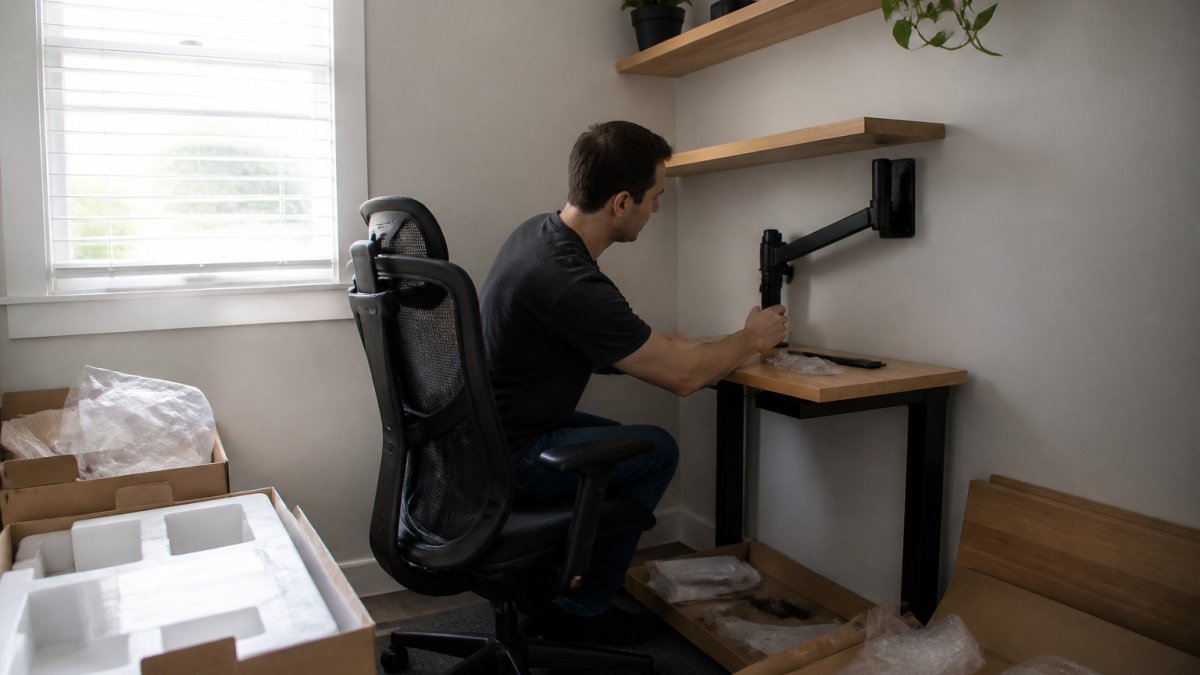
Start by measuring your room and your body. Chair seat height, desk height, monitor distance, and keyboard position all interact. If your chair is too high or too low, even the best desk won't help. If your monitor is too far away, you'll lean forward to see it, straining your neck.
The basic formula:
Vertical space is your secret weapon in a compact room. Wall-mounted shelves, pegboards, and floating desks reclaim floor space and reduce visual clutter, which also reduces mental strain.
Install shelves above your desk for reference books, supplies, and equipment you use daily. Mount your monitor on an adjustable arm rather than placing it on a stand, this frees up desk space and lets you angle the screen to reduce glare and neck strain. (Source: a systematic review of research on sitting and working furniture ergonomics)
Pegboards work well for frequently used items like headphones, cables, and notepads. They're adjustable, so you can rearrange as your needs change. Over time, you'll refine what works best for your workflow.
When square footage is limited, every piece should earn its place. Multi-functional furniture does double duty without doubling your footprint.
A desk with integrated storage is one example. A filing cabinet that doubles as a side table is another. Modular seating, like ottomans or small benches that tuck under desks, provides extra seating for guests without permanent floor space commitment.
Look for items that nest, fold, or stack. A rolling cart stores supplies and moves where needed. A small stool becomes a footrest during work and extra seating during calls. This flexibility is what separates a functional compact office from a cramped one.
Your furniture foundation is solid. Now add targeted accessories that fine-tune your setup and protect your spine during long work sessions.
A footrest keeps your feet flat and supported, which stabilizes your pelvis and reduces lower back strain.
A monitor arm mounts your screen at the correct distance and height, preventing neck strain from looking down or reaching forward.
A keyboard tray keeps your wrists neutral and your elbows at the right angle. If your desk is too high or too low, a keyboard tray bridges the gap.
An external keyboard and mouse are non-negotiable if you use a laptop. Laptop screens force you to look down and hunch forward, a recipe for neck and shoulder pain.
Lighting matters too.
Layout determines whether your furniture actually works together or works against you. A well-arranged compact office feels spacious and supports movement.
Position your desk perpendicular to windows when possible. This reduces glare on your monitor and lets you look out periodically, which rests your eyes and breaks up static posture.
Leave walking space. You need at least 24 inches of clearance to move your chair back and stand up.
Cable management isn't just aesthetic, it's functional. Tangled cables catch your feet, snag your chair wheels, and make adjustments harder.
Noise and distractions compound physical strain. If you share your space with others or live in a noisy area, add acoustic panels or soft furnishings to absorb sound.
You've assembled the pieces. Now make sure they're optimized for your body. Every spine is different. What works for your colleague might create problems for you.
A professional assessment can help identify issues. Book a chiropractic consultation online to get personalized guidance on your compact workspace setup.
Research on sitting and working furniture ergonomics emphasizes that furniture design alone doesn't guarantee good ergonomics, how you use the furniture matters equally.
Consult a qualified professional to assess your compact workspace and get personalized recommendations.
Building an ergonomic home office in a small space is achievable. It requires intentional choices about furniture, layout, and accessories, but the payoff is a workspace that supports your health instead of undermining it.
| Furniture Category | Key Feature | Best For Compact Spaces | Typical Footprint |
|---|---|---|---|
| Ergonomic Office Chair | Adjustable lumbar support | Under 26" seat width | 24-28" wide |
| Compact Standing Desk | Electric height adjustment | Desks under 40" wide | 36-40" wide |
| Small Desk with Storage | Built-in drawers or shelves | Eliminates need for cabinets | 48-60" wide |
| Wall-Mounted Shelves | Vertical storage | Frees floor space | 12-24" deep |
| Monitor Arm | Adjustable positioning | Reduces desk clutter | Mounts to wall or desk |
| Footrest | Neutral foot support | Stabilizes posture | 18-24" wide |
Yes. A small desk can be ergonomic if it positions your monitor at eye level, keeps your keyboard and mouse at elbow height, and provides enough surface area for your primary work tasks. The key is adjustability and proper placement of accessories like monitor arms and keyboard trays. Compact furniture for ergonomic home offices prioritizes these alignment factors over overall size.
Look for a small space ergonomic office chair with lumbar support, breathable mesh or fabric, adjustable seat height, and a base small enough for your room. Ensure the seat depth fits your thigh length without pressing into the back of your knees. Armrests should be adjustable or removable to save space while supporting your arms at desk height. Test the chair's swivel and mobility to confirm it doesn't obstruct doorways or pathways.
Use wall-mounted shelves above your desk for storage and keep frequently used items within arm's reach. Install a monitor arm to free up desk surface area. Add floating shelves or wall-mounted filing systems to store documents and supplies without consuming floor space. Vertical storage reduces clutter, improves your ergonomic home office setup for small spaces, and creates a more functional workspace.
A compact standing desk for home office use can work well if it has a small footprint and adjusts smoothly between sitting and standing heights. Look for models with cable management built in and a surface large enough for your monitor and keyboard. Alternating between sitting and standing reduces static posture strain and can improve circulation, though a quality chair remains essential for seated work periods.
Learn more about back pain care at our Montgomery, AL clinic, or book an evaluation.


