

Tennis Elbow Pain? What a Chiropractic Exam Checks First
Outer or inner elbow pain in Montgomery? Learn what a chiropractic exam checks first to tell tennis elbow, golfer's elbow, and referred pain apart today.
Read More →
Last Updated: October 6, 2026
Choosing the best ergonomic office chairs for chronic back pain is one of the most underestimated decisions people with chronic back pain make. The wrong seating can amplify pain, while the right chair can meaningfully reduce it. (Source: Occupational Safety and Health Administration (OSHA) guidelines)
Chronic back pain doesn't disappear because of a chair alone. But a poorly designed seat accelerates degeneration, strains muscles, and locks you into postures that worsen existing conditions. A well-designed ergonomic office chair for chronic back pain does the opposite: it supports your spine's natural curves, reduces muscle fatigue, and makes it possible to maintain good posture without constant effort.
The difference between a generic office chair and a true ergonomic office chair for chronic back pain comes down to four things: lumbar support that matches your spine's shape, adjustability that lets you customize fit to your body, materials that keep you comfortable during long hours, and design features that encourage movement rather than static positions.
This guide covers what to look for, how to set up your chair correctly, and the honest limits of what a chair can and cannot do for chronic pain.
The best ergonomic office chairs for chronic back pain share specific features that reduce strain on your lower back and support proper spinal alignment. Not every feature matters equally for every person, but these are the ones that move the needle.
Lumbar support is the single most important feature in an office chair for anyone with chronic back pain. Your lower back naturally curves inward (called lordosis). A chair without proper lumbar support flattens this curve, forcing your discs and ligaments to work harder and your muscles to compensate.
The best lumbar support is dynamic, it adjusts as you move and sit at different depths in the chair. Static lumbar support helps, but it only supports one position. If you shift forward or recline, that support becomes useless.
Look for chairs with adjustable lumbar support that you can move up and down and increase or decrease in firmness. Some chairs offer three-zone lumbar support, which targets your lower, mid, and upper back separately. For chronic back pain, the lower-back focus matters most.
Adjustability transforms a mediocre chair into one that fits your body. Chronic back pain often worsens when your chair forces you into a generic posture that doesn't match your proportions.
Seat height should allow your feet to rest flat on the floor with your knees at a 90-degree angle. If your feet dangle or your knees angle upward, pressure redistributes to your lower back. Seat depth is equally critical, too deep and your thighs compress, cutting off circulation; too shallow and you lose support.
Backrest angle adjustment lets you recline slightly, which reduces pressure on your discs during extended sitting. A backrest that locks at 90 degrees forces you into an upright position that fatigues your back muscles over time. Most people with chronic back pain benefit from a slight recline (around 100-110 degrees) during long workdays.
Armrest height and width matter too. Arms that are too high force your shoulders up, creating neck and upper-back tension. Arms that are too low make you lean sideways to reach them.
Mesh chairs breathe better than solid upholstery, which matters during extended sitting. Heat and moisture accumulation under your back can increase muscle tension and make existing pain worse.
Breathable materials also matter for circulation. Sitting compresses blood vessels in your legs and lower back. A chair that traps heat reduces circulation further, increasing stiffness and pain. Mesh or ventilated upholstery keeps airflow moving, supporting better circulation during the 8+ hours you're seated.
High-density foam in the seat cushion provides support without going flat after a few months. Low-quality foam compresses quickly, and once it does, you're sitting on a hard base that transfers pressure directly to your spine.
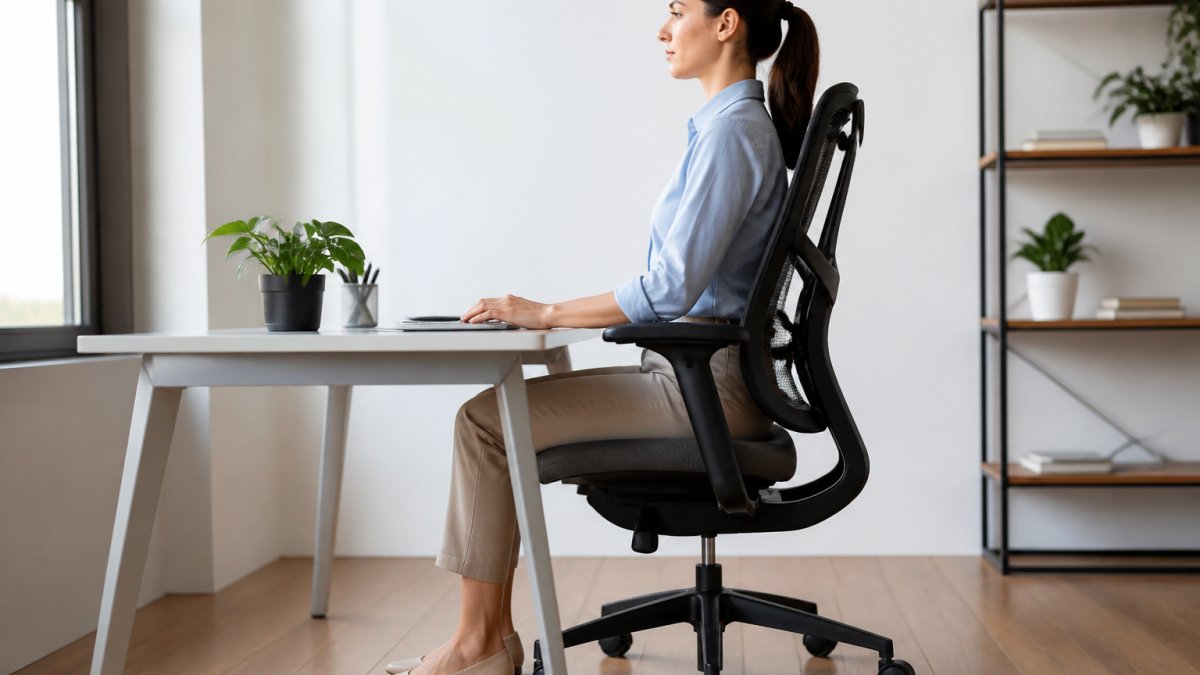
Buying the right chair is only half the equation. How you sit in it determines whether that chair reduces pain or becomes another source of it.
Most people with chronic back pain sit in ways that undermine even good chair design. They lean forward toward their monitor. They cross their legs. They slouch when they're tired.
The correct sitting posture for chronic back pain is not the rigid, military-straight position most people imagine. Your spine has natural curves. A healthy sitting posture maintains those curves rather than flattening them.
Your lower back should touch the lumbar support. Your shoulders should be relaxed, not hunched forward or pulled back. Your elbows should rest at 90 degrees, with your wrists neutral.
The most important rule: never stay in one position for more than 30 minutes. Chronic back pain worsens with static postures. Shift your position regularly. Stand and walk for 2-3 minutes every 30 minutes.
A chair only works if it's adjusted to your body. Most people buy an ergonomic office chair for chronic back pain and never adjust it beyond the height. That's why they don't see the pain relief they expected. (Source: National Institute for Occupational Safety and Health (NIOSH) recommendations)
Step 1: Set your seat height. Sit in the chair with your feet flat on the floor. Your knees should be at 90 degrees or slightly lower.
Step 2: Adjust lumbar support height. The lumbar support curve should align with the natural curve of your lower back, typically 4-6 inches above your seat. Sit back and feel where the support contacts your spine.
Step 3: Increase lumbar support firmness. Tighten the lumbar support dial or adjustment mechanism until you feel support without discomfort. It should feel like a hand gently supporting your lower back, not a hard push.
Step 4: Set seat depth. Sit back in the chair. There should be 2-3 inches of space between the front edge of the seat and the back of your knees.
Step 5: Adjust armrests. Your elbows should rest on the armrests at 90 degrees when your shoulders are relaxed. Adjust height and width so your arms feel supported without effort.
Step 6: Position your monitor. Place your monitor at arm's length away and at eye level when you're sitting with proper posture. Your eyes should look slightly downward at the top of the screen.
The most common mistake is setting the seat too high. People do this to reach their desk comfortably, but it leaves their feet dangling. This cuts off circulation and transfers weight to your lower back. Lower the seat and raise your desk or monitor instead.
Another frequent error is over-tightening lumbar support. More firmness is not better. Excessive lumbar support can actually increase muscle tension by forcing your back into a position that's too rigid. You want support that feels like assistance, not constraint.
Many people position their monitor too low, which forces them to look down constantly. This strains your neck and upper back, and that strain often radiates down to your lower back. Keep your monitor at eye level.
Failing to adjust the backrest angle is another oversight. A locked 90-degree backrest fatigues your muscles during long sitting. A slight recline (100-110 degrees) reduces disc pressure and muscle fatigue without making you feel unstable.
An ergonomic office chair for chronic back pain is a tool, not a cure. It reduces strain and supports better posture, but it cannot address underlying structural issues, disc degeneration, or conditions that require medical intervention.
If your chronic back pain stems from a herniated disc, arthritis, or spinal stenosis, a chair will make sitting more tolerable but won't reverse the condition. Pain relief from a better chair typically comes from reduced muscle fatigue and improved circulation, not from healing damaged tissue.
Prolonged sitting itself is problematic for chronic back pain, regardless of chair quality. Even the best ergonomic chair cannot replace movement. Sitting compresses your discs and shortens your hip flexors. The longer you sit without moving, the more your pain worsens.
Some chronic pain conditions worsen with certain chair features. If reclined positions increase your pain, keep your backrest more upright. If lumbar support aggravates your condition, reduce the firmness or remove it temporarily. A chair should reduce pain, not create it. If a feature causes discomfort, adjust or disable it.
Not every ergonomic office chair for chronic back pain works for every person. Your body type, workspace setup, and specific pain pattern all influence which chair features matter most.
If you're taller than 6 feet, look for chairs with extended seat depths and high backrests. Standard chairs often leave tall people with inadequate lumbar support because the support sits too low on their spine.
Your workspace layout matters too. If your desk is fixed and too high, you need a chair with a wide height range to compensate.
The type of chronic back pain you experience should guide your choices. If your pain is primarily lower-back focused, prioritize lumbar support and seat depth. If you experience upper-back and neck pain that radiates downward, focus on backrest height and armrest positioning.
Your budget matters, but not in the way most people think. An expensive chair with features you don't need wastes money. A mid-range chair with the specific adjustments your body requires delivers better results.
Chronic back pain complicates every aspect of your workday, and the wrong chair amplifies that struggle.
| Feature | Why It Matters | Best For |
|---|---|---|
| Adjustable lumbar support | Supports your spine's natural curve and reduces disc pressure | Anyone with lower-back pain |
| Seat height adjustment | Keeps feet flat and knees at 90 degrees | All body types |
| Seat depth adjustment | Prevents thigh compression and maintains proper support | Taller and shorter individuals |
| Backrest recline | Reduces disc pressure during extended sitting | People with chronic lower-back pain |
| Breathable mesh materials | Improves circulation and reduces muscle tension from heat | Anyone sitting 8+ hours daily |
| Armrest adjustment | Reduces shoulder and neck strain | Office workers with upper-body pain |
A chair for chronic back pain should include adjustable lumbar support that matches your spine's natural curve, seat height adjustment to keep feet flat on the floor, adjustable seat depth to support your thighs without pressure behind your knees, and armrests that allow your shoulders to relax. Breathable materials help reduce heat buildup during extended sitting. High-back design provides neck and shoulder support, which is especially important if you experience pain radiating upward from your lower back.
A well-adjusted ergonomic office chair can reduce strain on your spine and improve comfort during work, but it is not a cure for chronic back pain. The chair works best as part of a broader approach that includes movement breaks, stretching, proper posture, and professional care. Many people with chronic conditions find that reducing postural stress throughout the workday makes their symptoms more manageable. Results vary based on the underlying cause of your pain and how consistently you maintain proper positioning.
Start by setting seat height so your feet rest flat on the floor and your knees bend at 90 degrees. Adjust lumbar support to fit the inward curve of your lower back without forcing it. Position the seat depth so there is a 2-3 inch gap between the seat edge and the back of your knees. Armrests should support your forearms at elbow height without forcing your shoulders up. Backrest angle should support your natural posture without tilting too far back. Make small adjustments over several days to find what feels most comfortable, and reassess if you change your desk height or monitor position.
Mesh and leather offer different benefits. Mesh is breathable and ideal for long workdays because it allows air circulation, reducing heat buildup and moisture. Leather is durable and easier to clean but traps more heat. For chronic back pain relief, breathability matters because discomfort from sweating can compound existing pain. Mesh is generally preferred for all-day sitting, but the material alone does not determine back support, lumbar support quality, adjustability, and proper positioning are far more important than fabric type.


