

What Happens If Chronic Back Pain Is Left Untreated?
Untreated chronic back pain can lead to nerve damage, muscle atrophy, and disability. Learn the risks and when to seek care. Discover your options today.
Read More →
Last Updated: September 19, 2026
Most people try to copy a full-size office into a room that cannot hold one, so their ergonomic desk setup fails. (Source: OSHA's guidelines for computer workstations)
An ergonomic desk setup for small spaces is not a scaled-down office but a different set of choices: pick the few items that protect your body, then build around them.
The problem is usually depth, not width. A standard desk runs about 30 inches deep. Many small rooms give you 24 inches or less.
People often sit too close to their screens, round their shoulders, and crane their necks. The setup may look fine in photos, but posture can suffer.
A small room can still support neutral posture if you are strict about what earns a place on the desk.
In a tight room:
The fix is to move the screen, not your body. A guide to computer workstation distance from OSHA notes that the monitor should sit at a comfortable viewing distance, roughly an arm's length away. In a shallow room, that means using the wall, not the desk, to hold the screen.
Get the height right first. Everything else depends on it.
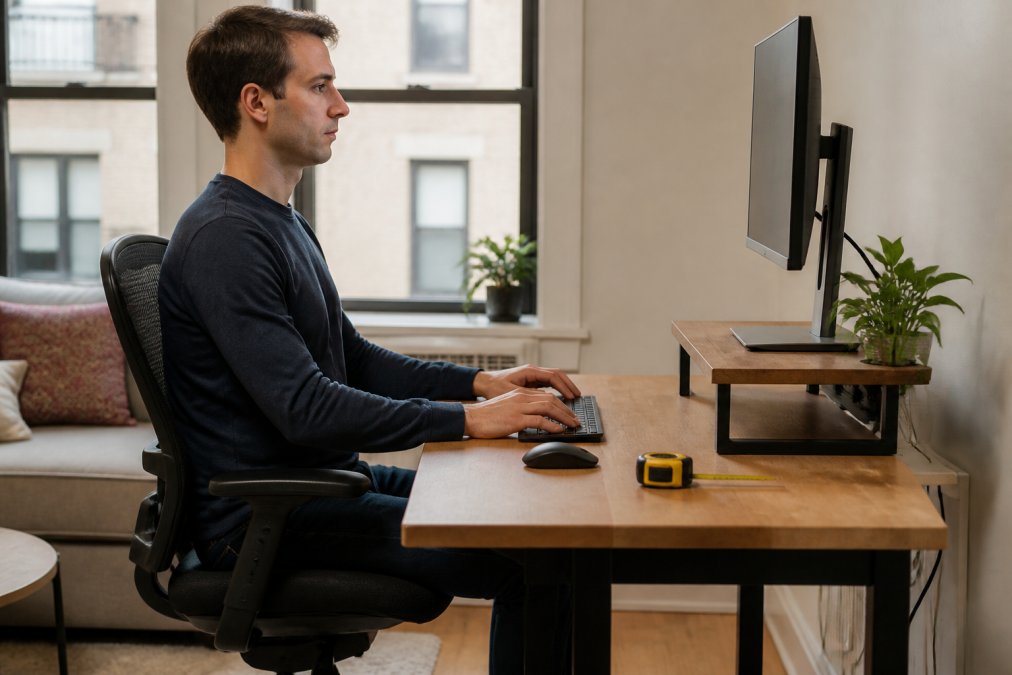
Ergonomic desk height lets your forearms rest level while your shoulders stay relaxed. For most seated adults that is 24 to 28 inches, but your body decides the exact number.
Measure it yourself:
A keyboard tray drops the typing surface below the desk, fixing elbow angle and wrist line at once, often the single biggest posture win in a small room.
A monitor arm frees the desk surface and puts the screen where your neck wants it.
What to look for:
You do not need a new office, just to fix the three or four things causing the strain.
Work through this list in order:
The best small-space furniture does two jobs; anything doing one is taking up room you do not have.
Options that work in tight rooms:
Here is how the main options compare:
| Option | Space Used | Best For | Trade-Off |
|---|---|---|---|
| Wall-mounted desk | None when folded | Very tight rooms | Limited surface area |
| Standing desk converter | Small | Existing tables | Adds height, not depth |
| Adjustable height desk | Standard | Daily sit-stand use | Costs more, needs depth |
| Multi-purpose piece | Varies | Studio apartments | Less stable at full load |
This is the ergonomic problem almost no small-space guide addresses: in a studio, the surface holding your keyboard at 10 a.m. holds your dinner plate at 7 p.m., and your body needs differ in each mode.
When the same surface serves as a vanity or craft station, the risks shift: makeup and detailed craft work pull your head forward and down, loading the neck, and the height that works for typing is usually too low for close visual work.
Multi-purpose furniture trades stability for flexibility: a folding desk or drop-leaf table flexes under load, and that flex is a hidden strain source because you unconsciously tense to compensate.
Clutter steals space and attention. A minimalist workspace is not about looks but about keeping the surface clear so your body has room to move.
Try this:
Route cables along the back edge with cable sleeves
Mount a power strip under the desk
Label each cord so you can find it later
Group chargers into one spot
A shelf above the monitor for notebooks and supplies
A pegboard for tools and cables
A wall file for papers you still need
Three things get ignored in small rooms, and all three affect how you feel by day's end.
Heat quietly wrecks small-space setups, and almost no ergonomic guide covers it. A closed door, single window, and desk pushed against a wall create a pocket of still air; add a laptop, monitor, and your own body heat, and the room warms faster than a larger office.
What actually helps:
Lighting, acoustics, and heat interact: a lamp behind the monitor adds glare and heat, a rug that softens sound traps dust near intake vents, and a fan that cools the room moves paper and adds call noise.
Aim for at least 40 inches wide and 20 to 24 inches deep. Depth matters most: you need enough room for a keyboard, wrist rest, and monitor at a comfortable viewing distance of roughly 20 to 30 inches. If floor space is tight, a wall-mounted desk or a folding model preserves the same surface area without the footprint. Measure your elbow-to-fingertip length before buying, since that determines whether a shallower surface will still let you keep a neutral posture.
Set the top of the screen at or slightly below eye level and keep the monitor an arm's length away. In a narrow room, a monitor arm lets you push the screen back toward the wall and still angle it toward your seat, which frees desk surface area. Keep the keyboard close enough that your elbows stay near a 90-degree angle and your wrists remain flat. A keyboard tray can help when the desk surface is too high for your seated height.
The 20-8-2 rule is a break schedule: every 20 minutes, stand for 8 minutes, and spend 2 minutes moving or stretching. It targets the static loading that builds up during long desk sessions, which is a common driver of neck and lower back discomfort. Setting a timer makes it easier to follow. If pain persists despite better positioning and regular breaks, a qualified professional can assess whether something else is contributing.
Better positioning can reduce strain on your neck, shoulders, and lower back by keeping your spine closer to a neutral posture, but it is not a treatment for an existing condition. If you have chronic pain, a history of injury, or symptoms that worsen over time, have a qualified professional evaluate you before assuming a desk change will resolve it. Setup adjustments work best alongside, not instead of, proper assessment.


